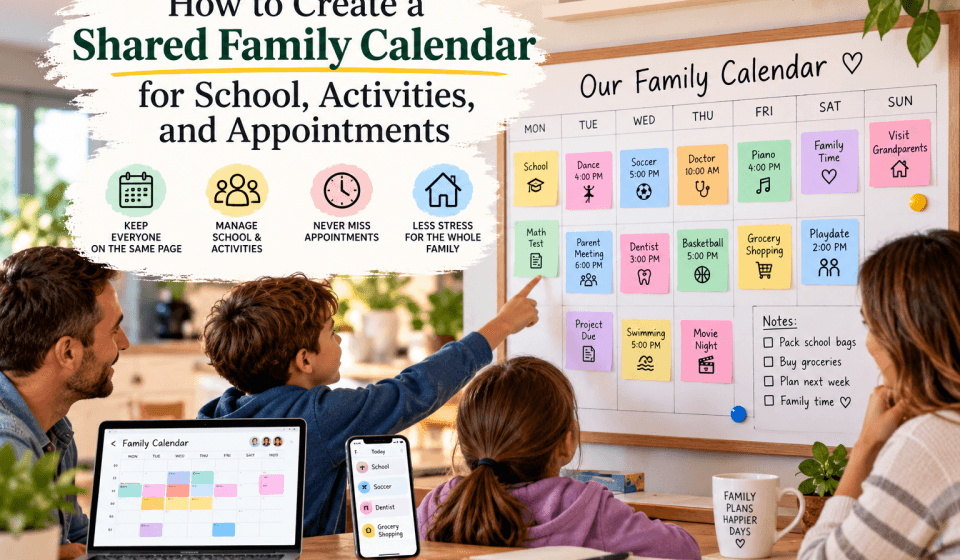

A shared family calendar gives everyone one reliable place to see school events, activities, appointments, work commitments, and important household plans. Instead of searching through messages or asking who is available, family members can check the same schedule and understand what needs to happen next.
In this guide, you’ll learn how to create a shared family calendar, decide what belongs on it, choose a simple structure, assign responsibilities, and keep it accurate without turning calendar management into another chore.
Start With the Family’s Scheduling Needs
Before choosing an app or adding events, identify the types of information your household needs to manage. The best calendar reflects how your family actually spends time, rather than trying to record every detail of daily life.
Make a quick list of recurring and occasional commitments, such as:
- School days, holidays, parent-teacher conferences, and early dismissals
- Sports practices, games, lessons, clubs, and rehearsals
- Medical, dental, and therapy appointments
- Work travel, late meetings, and regular office days
- Childcare arrangements, babysitting, and pickup responsibilities
- Birthdays, family gatherings, and community events
- Bill due dates, school projects, and registration deadlines
- Travel plans, house guests, and important household tasks
Not every personal appointment needs to be visible to everyone. The goal is to share information that affects planning, transportation, childcare, meals, or family availability.
Choose a Calendar Tool Everyone Can Use
A shared family calendar only works if the people who need it can access it easily. Choose a service that works on the devices your household already uses and does not require complicated steps for everyday updates.
Common options include Google Calendar, Apple Calendar, Microsoft Outlook, and family-focused apps such as Cozi. You can also use a shared digital calendar alongside a paper calendar in a kitchen or entryway.
What to look for
- Shared access: Adults and older children should be able to view the calendar. Give editing access only to people who need it.
- Mobile notifications: Reminders are useful when someone is leaving work, packing equipment, or preparing for an appointment.
- Calendar layers: Separate calendars for school, activities, appointments, and household plans make busy weeks easier to read.
- Recurring events: Regular practices, lessons, and work schedules should be added once and repeated automatically.
- Invitations and subscriptions: Some schools, teams, and organizations provide calendars that can be added or subscribed to.
- Privacy controls: You should be able to decide whether others see full event details or only that you are busy.
If your family uses different phone brands, a cross-platform service is often the simplest choice. If everyone uses the same device ecosystem, the built-in calendar may be enough. The best tool is usually the one everyone will check and update consistently.
How to Create a Shared Family Calendar
1. Create one shared account or calendar group
Decide whether the calendar will be owned by one adult’s account or managed through a family group. Avoid creating it under a child’s school account, since access may change when the child changes schools or graduates.
Use a clear name such as “Family Schedule” or “Household Calendar.” Then invite the adults and any children who are old enough to manage their own commitments.
2. Set up separate calendar categories
A single calendar can become difficult to read when every event uses the same color. Separate categories help people scan the week quickly.
A practical structure might include:
- School: Closures, exams, performances, conferences, and deadlines
- Activities: Practices, games, lessons, rehearsals, and club meetings
- Appointments: Medical visits, dentist appointments, and other scheduled services
- Work and travel: Late shifts, business trips, and unavailable periods
- Family and household: Birthdays, visitors, trips, repairs, and shared tasks
Do not create so many categories that the calendar becomes confusing. If two events require the same planning response, they may belong in the same calendar.
3. Add fixed commitments first
Begin with events that rarely change. Add school hours, standing work schedules, weekly activities, regular appointments, and recurring transportation duties.
For each event, include the information someone would need if they were responsible for getting a child there. Record the start time, end time, location, travel time, and any equipment or preparation required.
For example, instead of adding “soccer” from 4:30 to 5:30 p.m., use a more useful entry such as:
- Event: Maya soccer practice
- Time: 4:30–5:30 p.m.
- Location: North Field, 12 Oak Street
- Note: Bring cleats, water, and shin guards
4. Add travel and preparation time
The event time is not always the time commitment. A 30-minute appointment may require 20 minutes of driving, parking, and check-in. Add a separate travel block or adjust the calendar entry so the person responsible sees the full impact on the day.
Preparation reminders are also helpful. Add notes such as “complete permission form,” “pack instrument,” or “bring insurance card.” For important events, set a reminder the day before as well as one shortly before departure.
5. Add responsibilities, not just events
A calendar can show where a child needs to be without showing who is taking them. Add the responsible person to the event title or notes when transportation and supervision matter.
Examples include:
- “Leo orthodontist — Jordan driving”
- “Ella pickup — Sam, 3:15 p.m.”
- “School project due — parent check-in Sunday”
If responsibilities change often, use initials, labels, or a separate shared task list. Make the system obvious enough that nobody has to interpret what a color or abbreviation means.
Use Recurring Events Carefully
Recurring events save time, but they can also create problems when schedules change. Add recurring practices, weekly lessons, and regular work commitments only after confirming the full season or term schedule.
When creating a repeated event:
- Set an end date instead of repeating indefinitely.
- Check whether holidays, school breaks, or special sessions affect the pattern.
- Update individual dates when a practice is canceled or moved.
- Review recurring events at the start of each school term, sports season, or activity session.
For school calendars, it may be easier to subscribe to the school’s official calendar if one is available. However, still review imported events. Some school feeds include information that is useful for staff but not relevant to your household.
Create Simple Rules for Keeping the Calendar Accurate
The setup is only the beginning. A shared family calendar stays useful when everyone follows a few clear rules.
Agree on what must be added
Decide which commitments belong on the calendar. A helpful rule is that anything affecting another person’s transportation, childcare, availability, or meal planning must be added.
Personal activities that do not affect the household may not need to be shared in detail. This keeps the calendar focused and protects reasonable privacy.
Add events as soon as they are confirmed
Do not rely on memory or messages that can be buried in a group chat. Add a new appointment, school date, or activity immediately, even if the event is several months away.
If an event is tentative, label it clearly with a note such as “tentative” or “hold.” Update or remove it once the details are confirmed.
Use consistent event titles
Choose a naming style that makes events easy to understand at a glance. Include the person, event type, and location when useful. For example, “Ava — piano lesson — music studio” is more helpful than “lesson.”
Review the week together
Set aside 10 minutes once a week to look ahead. Many families find it useful to review the next seven days during a weekend meal or on a Sunday evening.
Check for:
- Overlapping appointments or activities
- Unassigned pickups and drop-offs
- Required forms, uniforms, equipment, or supplies
- Work commitments that affect family coverage
- Changes to meals, bedtime, or transportation
- Events that need to be canceled or rescheduled
This short review turns the calendar into a planning tool rather than a record of problems discovered at the last minute.
Make the Calendar Easy for Children to Use
Children can benefit from seeing their own schedules, especially as they become more independent. Younger children may need a simple visual version with pictures or a short list of the day’s plans. Older children can learn to add assignments, practices, and social commitments themselves.
Give children appropriate access and explain the household rules. For example, they may be allowed to add events but should tell an adult before confirming plans that require transportation. Encourage them to include location, start time, and end time rather than adding vague entries such as “hang out.”
A visible weekly printout can also help children who do not regularly check a phone. Place it somewhere practical, such as near the breakfast table or family command center.
Protect Privacy and Avoid Calendar Overload
Use the least amount of personal information necessary. For a sensitive appointment, a title such as “medical appointment” may be enough. You do not need to include private details in a calendar that is visible to every family member.
Review sharing permissions regularly, especially after a separation, a change in childcare, or a child becoming an adult. Remove former household members and limit access to people who genuinely need the information.
It is also possible to include too much. Avoid adding every reminder, minor errand, or conversation topic. If the calendar becomes crowded with low-priority items, important events are harder to spot. Use a task list for chores and a notes app for information that does not have a specific time.
Common Shared Calendar Mistakes
- Keeping multiple competing calendars: Decide which calendar is the final source of truth.
- Leaving out locations: A time without a place is not enough when transportation is involved.
- Ignoring event changes: Cancel, move, or edit events promptly so nobody follows outdated information.
- Using unexplained colors: Write down what each color represents and keep the system consistent.
- Forgetting buffer time: Account for driving, parking, transitions, and preparation.
- Giving everyone full editing access: Use view-only permissions when that is all someone needs.
- Failing to review the calendar: An accurate calendar is more useful when the family regularly discusses what is coming up.
Frequently Asked Questions
What should go on a shared family calendar?
Add events that affect family availability, transportation, childcare, meals, or planning. Typical examples include school dates, activities, appointments, work travel, holidays, visitors, and important deadlines.
Should each child have a separate calendar?
Separate calendars or color categories can make each child’s schedule easier to identify. However, keep them within one shared calendar system so adults do not have to check several unrelated accounts.
How far in advance should we add events?
Add confirmed events as soon as you receive them, even if they are months away. Review the next week in detail and check the next month for major deadlines, trips, and appointments.
What is the best color-coding system?
Choose colors based on people or event types, then use them consistently. For example, one color can represent school, another activities, and another appointments. Avoid relying on color alone; include clear names and locations too.
What should we do if someone does not check the calendar?
Agree on a routine, such as a weekly family review, and use notifications for time-sensitive events. Keep the calendar simple and make it the agreed-upon place for schedule changes instead of scattering updates across text messages and email.
Keep the System Simple Enough to Last
A shared family calendar works best when it answers three questions quickly: What is happening, when and where is it happening, and who is responsible? Start with the commitments that create the most confusion, add useful details, and build a weekly review habit.
As your family’s needs change, adjust the categories, permissions, and reminders. The goal is not to document every moment. It is to give everyone a dependable view of the plans that matter.